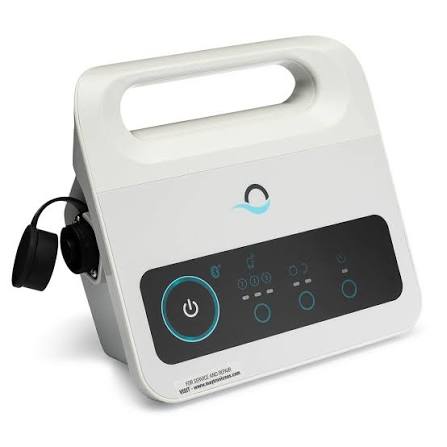
Is your Dolphin robot no longer starting, even though the robot itself seems to be in perfect condition? Nine times out of ten, it’s not the robot. It’s the power supply unit.
This is the part that fails most often on an electric robot, well before the motor. The reason is almost always the same: a unit left outside all season, placed on the ground, in the sun, or under a gutter. The electronics eventually give out, and the robot becomes unusable even if there is nothing wrong with it.
Dolphin Advanced power supply with Bluetooth
This is the genuine Maytronics 115 V power supply, featuring a weekly timer and Bluetooth connectivity. It is the replacement part for Dolphin models equipped with remote control and weekly programming.
Replacing the unit rather than the entire robot is almost always the right move when the robot is still functional. A Dolphin that has been used for several seasons and has only had its power supply fail will be good for years to come.
Compatible Dolphin models
Advantage, Advantage Ultra, Nautilus CC, Proteus DX3, Proteus DX4, S100, S200, Cayman, T25, T35, Active 15, Active 20, Explorer E20, Explorer E30, Quantum, and Triton PS.
If your model does not appear in this list, send us the exact number printed on the label of your old unit. Dolphin power supplies are not interchangeable between different product lines.
Specifications
-
Voltage: 115 V
-
Power: 120 W
-
Connectivity: Bluetooth
-
Programming: Weekly timer, automation mode
-
Package dimensions: 9.2 × 3.7 × 8.2 in
-
Weight: 2.4 lbs
-
Warranty: 6 months
-
Manufacturer part number: 99956035US-F1
- Genuine Maytronics part
How to know if it's the unit
First, check the outlet and the GFCI (ground fault circuit interrupter): press Reset and test the outlet with another device. If the outlet has power and the unit displays no lights, or displays a persistent error code, it is the unit.
One case requires caution: if the GFCI trips as soon as you plug it in, unplug it and do not try again. This signals water infiltration, either in the unit or the cable, and you must have it checked before replacing anything.
Ensuring its longevity
The new unit deserves better than the spot where the previous one died. Keep it dry, elevated, and in the shade at the distance from the pool indicated in the manual, and bring it inside between cycles. This is the most common failure for a robot, and it is also the easiest to avoid.
Frequently asked questions
Does this unit work with any Dolphin?
No. It is intended for the models listed above. Check your old unit's part number before ordering.
What is Bluetooth for?
It allows you to control the robot and manage programming from a mobile device on models that support it.
My robot is old. Is it worth replacing the unit?
If the robot is still running correctly and only needs filters and brushes otherwise, yes, absolutely. If the motor or internal electronics are also showing signs of wear, do the math first.
Is this a genuine part?
Yes, it is a genuine Maytronics part.
Not sure about the right number? Send us a photo of your current unit's label and we will confirm compatibility. Write to us or call 450-818-8200.